
How to lead a service or Bible study with FrameDecks, so the technology supports what you say instead of distracting from it.
Who this is for: pastors, worship leaders, Bible study and small-group leaders, and teachers.
On this page
- Your responsibilities
- Five things to know
- Before the service
- During the service
- After the service
- When something goes wrong
- Getting started in this role
Your responsibilities
- Decide the order of the service and what appears on screen: questions, scriptures, announcements, song words.
- Give the media team the material in good time (ideally by midweek).
- Review the meeting before the day.
- Lead; let the operator handle the controls when you have one.
Five things to know
- A meeting is a list of Frames. Each Frame is one step of the service (Welcome, Scripture Reading, Discussion…). See Frames.
- Your script is private. Write what you plan to say in each Frame's Teleprompter script. It never appears on screen; only you see it.
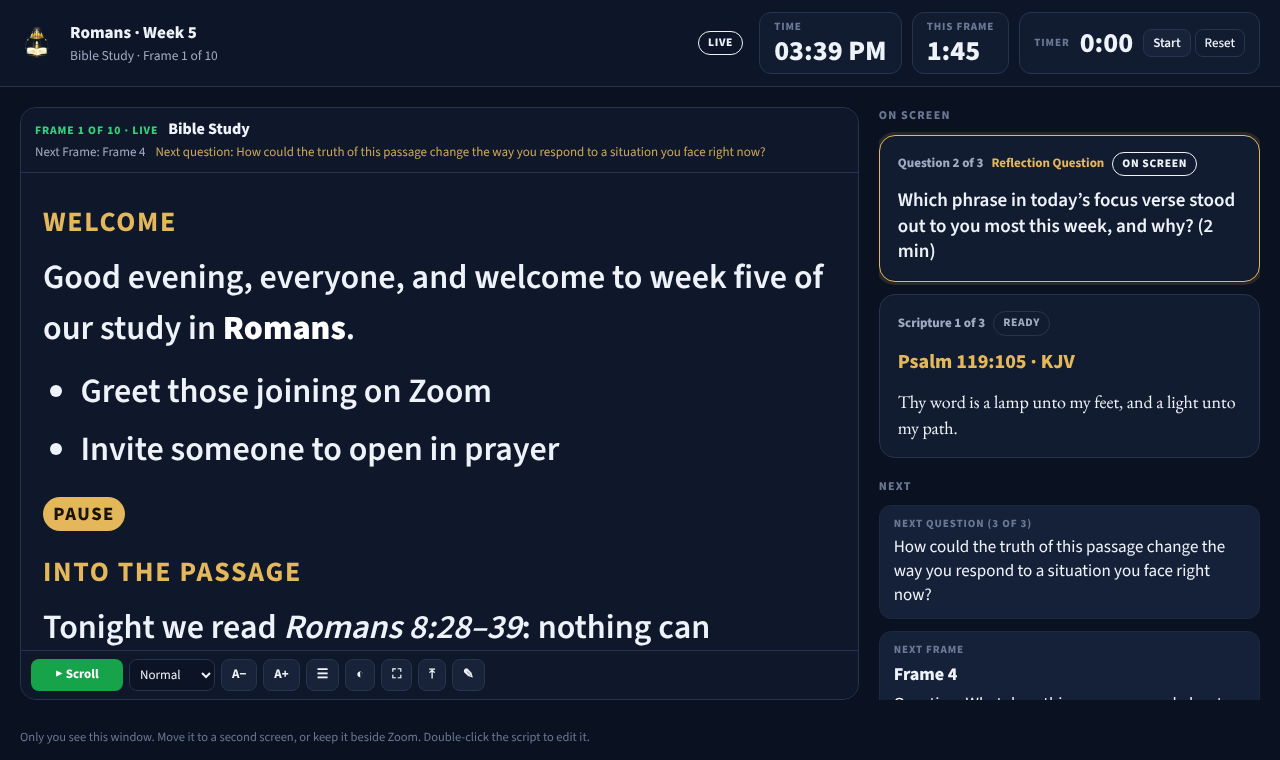
- The Teleprompter is your confidence monitor. Live tools → Teleprompter → In this window (R) docks it beside the Studio. Live tools → Teleprompter → Own window opens it on a second screen; select On screen & next to see what is on screen, what comes next, the time and a timer. The phone remote has it too. Leading on Zoom or Teams from one laptop? Live tools → Teleprompter → Over Zoom (Shift+R) puts your script in a see-through window over the meeting, so you still see the participants. Zoom and Teams never share it. See Teleprompter overlay.
- You can draw. Annotate (D) lets you circle a word in a verse or underline a phrase, on the PC or from a phone.
- Hide all is always safe. Esc (or HIDE ALL on the phone) clears the screen without deleting anything.
Before the service
- Send the passage, questions, songs and announcements to the media team.
- Check each question's wording (double-click a question in its list, or its card on the Studio Canvas, to edit it).
- Write each Frame's Teleprompter script (Content Settings → Frame → Teleprompter script, or double-click the text in the Teleprompter). Use
# Heading,- bulletand[PAUSE]to make it easy to follow. - Walk through the whole meeting: select each Frame and look at the Studio Canvas, or use Run-through on the phone.
- Agree hand signals with the operator (for example, a nod = next).
- Leading on Zoom or Teams? Open the Teleprompter overlay (Shift+R) in a test call. Choose Meeting (press 3), place it over the participants near your camera, and check that Stay on top (📌) is on.
During the service
- Keep the Teleprompter where you can see it: docked in the Studio, the Teleprompter window on a second screen, the Teleprompter overlay over Zoom or Teams, or TELEPROMPTER on your phone. Press Space to scroll it, and A− / A+ to change the text size.
- Watch the This Frame time and the Timer to pace discussion.
- If you run the service yourself, keep the phone in your hand on the Simple remote: NEXT CONTENT for the next question, NEXT FRAME for the next part.
- To fix a typo you notice on screen, double-click the card on the Studio Canvas, correct it and press Enter. The screen updates straight away.
- To find a Frame or question quickly, press Ctrl+K and type a few words. If Zoom is in front, press Alt+Space for Spotlight, which finds the same things.
- In the overlay, press 1 to 5 to make it more or less see-through: Conference (4) when you need to see faces, Presenter (2) when the text is hard to read. The toolbar fades by itself; move the mouse to bring it back.
After the service
- Note any questions that didn't work, for next time.
- Ask the media team to keep the meeting (or save a Frame as a template) for the next week.
When something goes wrong
Stay calm and keep leading. The congregation follows your tone more than the screen.
| Situation | Say or do |
|---|---|
| The wrong slide appears | Ask the operator for HIDE ALL, then carry on speaking |
| The screen must go dark (a sensitive moment, a mistake) | BLACK SCREEN (K on the PC) |
| You need a moment to find the next item | FREEZE (F) keeps the picture still while things change behind it |
| The phone stops working | Carry on from the PC, or ask the operator to take over |
Getting started in this role
- Read Getting started and Service planning.
- Build a practice meeting with three Frames, one question and one scripture.
- Open the Teleprompter window and step through it from your phone.
- Lead one service with an operator beside you before leading alone.